
After saying every CRM needs an MCP server, I should probably clarify something before the command line files a formal complaint.
MCP is important.
But not everything needs to become MCP.
Some work belongs in an agent-facing protocol. Some work belongs in a CLI. Some work belongs in a workflow automation platform. The architecture gets noisy when we pretend one interface should do every job.
MCP is for agent-native interaction. CLI is for operator-native control.
That distinction matters if you are building AI-native GTM systems. CLIs often win when the agent needs speed, low context overhead, local inspection, composable commands, and focused access to large files. MCP often wins when the agent needs shared access to external systems, centralized authentication, structured outputs, permission boundaries, and audit logs.
So this is not "MCP good, CLI old." It is a more practical question: which interface matches the job?
MCP Is For Agent Interaction
MCP, the Model Context Protocol, gives AI agents a standard way to discover and use tools exposed by external systems. In GTM terms, that means an agent can connect to a CRM, enrichment platform, call intelligence system, workflow tool, or knowledge base and understand what useful actions are available.
A CRM MCP server might expose tools for searching accounts, getting opportunity context, creating a task, adding a note, updating a field, or reading activity history. A revenue intelligence MCP server might expose call search, transcript access, competitor mentions, recent deal risks, and call summaries. A workflow automation MCP server might expose workflow listing, run inspection, workflow triggering, and draft workflow creation.
The point is not that the agent gets every raw API endpoint. The point is that the agent gets a curated set of useful, named, permissioned tools it can reason about during a task.
That curated surface is the advantage. It is also the cost.
MCP servers describe their tools with schemas, names, parameters, and descriptions. That structure helps the agent understand what it is allowed to do, but it can consume meaningful context before the agent has done any useful work. If a server exposes too many tools, or if an agent connects to several large servers at once, the plumbing starts competing with the task.
That does not make MCP bad. It means server design matters. A good MCP server should expose a small number of high-value tools, not a copy of the entire API.
CLIs Are For Operator Control
A CLI is different. A command-line interface is usually designed for builders, admins, engineers, and operators. You run a command. It inspects something, changes something, deploys something, exports something, or gives you structured output.
CLIs also have a strange advantage with AI agents: models already know a lot of them. The model has seen years of examples for shell commands, jq, grep, git, docker, psql, gh, az, kubectl, and similar tools. It often does not need a schema loaded into context to understand what a command does.
That can make CLIs faster and cheaper for inspection-heavy work, especially when the output is scoped carefully.
In GTM systems, CLIs are useful for auditing CRM metadata, checking field permissions, exporting schema, inspecting workflow definitions, validating sync configuration, running one-off data quality checks, comparing sandbox and production settings, debugging integration failures, generating reports from scripts, and running dry-run migrations.
If MCP is how an agent acts inside the workflow, the CLI is how a builder inspects the machinery around the workflow.
The CLI advantage gets even stronger with large structured files. If an agent needs to inspect a 500MB CSV export, a giant JSON payload, or Parquet files from a warehouse export, you do not want it loading the file into context. You want it using tools like duckdb, jq, or focused scripts to sample, aggregate, and inspect the data from the outside.
That pattern maps directly to GTM work: enrichment exports, CRM object dumps, failed sync logs, routing tables, territory assignments, and attribution datasets.
A GTM Example
Imagine an agent reviews pipeline hygiene every morning. It needs to find open opportunities with no next step, check whether the account had a recent call, look for missing contacts, create tasks for reps, and send a Slack summary.
That workflow should probably use MCP or direct API tools. The agent is doing recurring, interactive work across GTM systems. It needs controlled access, clear tool definitions, and approval gates for sensitive actions.
Now imagine the agent notices something odd.
Twenty opportunities are missing a required field that should be populated by automation. The question changes. Now you need to inspect the system. Is the field still required? Did someone change a validation rule? Did the automation fail? Did the sync mapping change? Is the sandbox different from production?
This is where a CLI or script can be better. You can run a read-only audit, pull metadata as JSON, compare configurations, and produce a clean report. The agent may still be involved, but it is acting more like an operator using tools than a workflow participant taking business actions.
When To Use MCP
Use MCP when the task is interactive, contextual, and agent-facing. Good MCP use cases in GTM include querying CRM records during pipeline review, pulling account context before a sales meeting, adding a note after analyzing a call, creating follow-up tasks, triggering enrichment for a single account, searching call transcripts for deal risks, starting an approved workflow, reading customer context from a knowledge base, or drafting an update that requires approval before writing.
MCP works best when the agent needs a curated tool surface instead of raw API access. The key word is curated. You do not want to expose every possible system operation to an agent. You want to expose the actions that are useful, understandable, permissioned, logged, and safe enough to call.
MCP is especially useful when the system is shared across a team or exposed to non-technical users. Most business users are not going to run a CRM CLI from a terminal. They are going to use Claude, ChatGPT, Slack, or an internal agent interface. For that world, MCP makes more sense than telling the sales team to install command-line tools and manage credentials locally.
When To Use A CLI
Use a CLI when the work is closer to inspection, administration, debugging, or repeatable operations. Good CLI use cases in GTM include auditing Salesforce field permissions, comparing HubSpot property definitions across portals, exporting workflow configuration, running dry-run migrations, checking whether required fields changed, validating API credentials, pulling metadata snapshots, running deduplication reports, inspecting failed sync jobs, and generating nightly data quality reports.
CLIs work best when the task is operational and structured. They are also useful when you want deterministic output that can be cached, diffed, versioned, or reviewed.
The caveat is security. An agent with broad shell access can do a lot of damage. If it runs under your user credentials, the underlying systems may not know whether a human or an agent took the action. That matters in GTM systems where deleting records, changing owners, modifying stages, or exporting customer data has consequences.
So CLI access should be scoped carefully: prefer read-only commands for audits, use dry-run modes where possible, ask for JSON output and parse it explicitly, run risky commands in sandboxed environments, avoid broad production credentials, and log every command used for operational work.
Where Workflow Automation Fits
Workflow automation tools sit between these two worlds. n8n, Workato, Tray, Zapier, and similar tools are built to execute workflows reliably. They handle triggers, retries, branching, credentials, scheduling, and integrations.
For GTM, that matters because not every task should be handled by an agent in real time. Some workflows should be deterministic: route a lead, sync a field, create a renewal task 90 days before contract end, notify a Slack channel when a high-value opportunity changes stage, or run nightly enrichment.
Other workflows benefit from agent reasoning: summarize why a deal is at risk, decide whether missing activity is a real concern, draft a custom follow-up, triage which accounts deserve research, or propose CRM cleanup actions.
MCP belongs closer to the business workflow. CLI belongs closer to the system inspection loop. Workflow automation belongs closer to repeatable execution.
A Practical Pattern
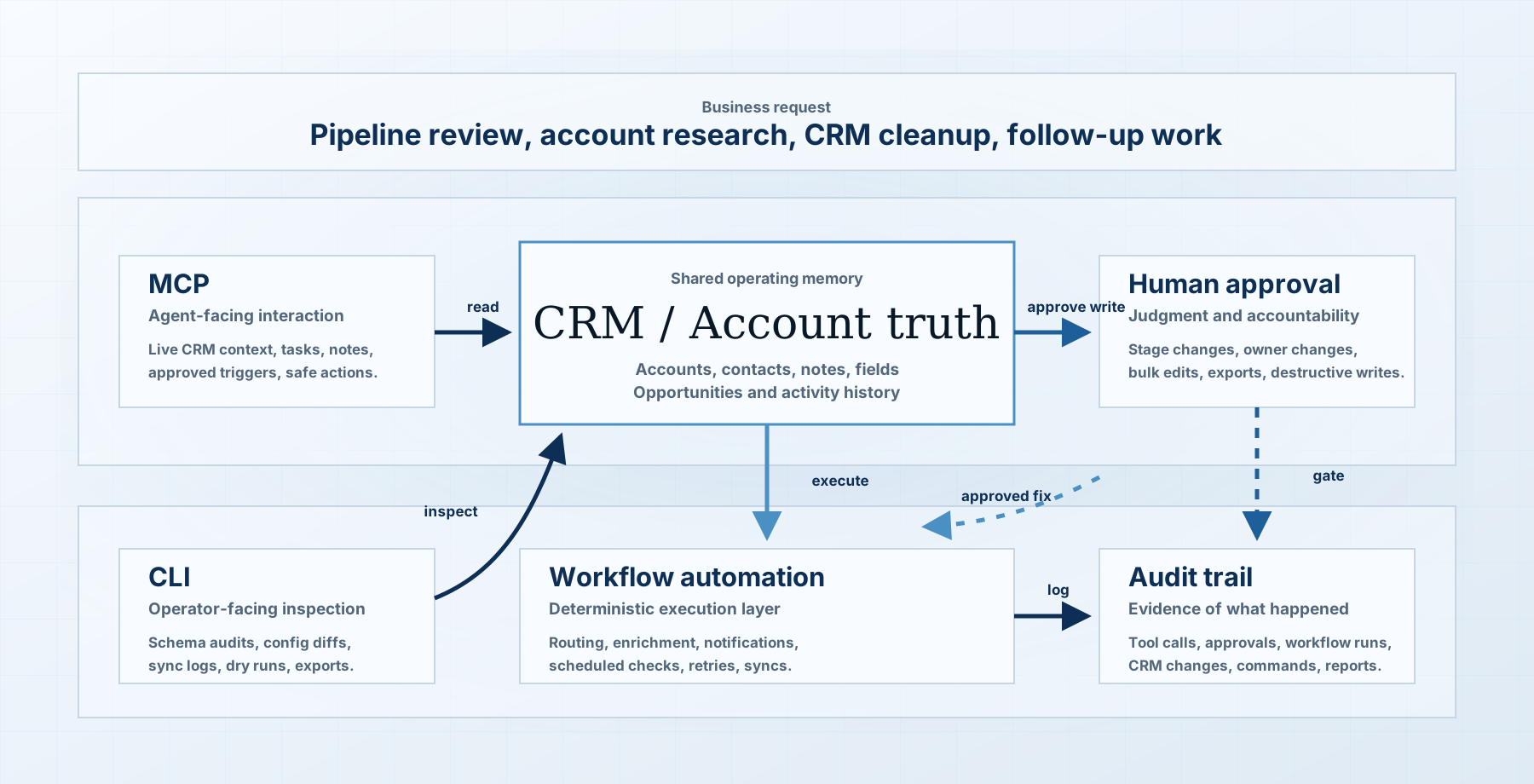
The pattern I would use for GTM automation is simple. Use MCP for the agent's live toolbelt: search CRM, get account context, read a call transcript, create a task, draft a note, trigger an approved workflow.
Use CLIs for the agent's inspection kit: audit systems, export metadata, validate config, compare environments, and produce structured reports.
Use workflow automation for the execution layer: routing, enrichment, notifications, scheduled checks, syncs, and other work that should run the same way every time.
Then connect them with approval gates. If the agent discovers a problem through MCP, it can request a CLI audit or inspect a report generated by one. If the audit confirms the issue, the agent can draft a fix. If the fix is low-risk, a workflow can execute it. If the fix is sensitive, a human approves it first.
That is how the system becomes useful without becoming reckless.
The Boundary Matters
The boundary between MCP and CLI is not about which one is more modern. It is about who the interface is designed for.
MCP is designed for agents. CLIs are designed for operators. Agents can use CLIs, and operators can trigger MCP-backed systems, but the design assumptions are different.
MCP should be readable to an agent. It should have clear tool names, schemas, descriptions, permissions, and safety boundaries. CLIs should be readable to an operator. They should have explicit flags, dry-run modes, JSON output, versioning, and predictable behavior.
MCP and CLI are not enemies. A well-designed MCP server can wrap CLI-backed operations. A CLI can call an API that also powers an MCP server. The implementation matters less than the interface contract.
The question is not what code sits underneath. The question is what surface you expose to the agent, the operator, and the business user.
The Bigger Point
The next phase of GTM automation is not "replace everything with agents." It is designing the right interfaces for the right kind of work.
Agents need tool access. Operators need control surfaces. Workflows need reliable execution. Humans still own judgment, risk, and accountability.
The teams that get this right will not ask, "Should we use MCP or CLI?" They will ask what the agent is trying to do, what the operator needs to inspect, what should run deterministically, and what needs approval.
That is the practical architecture: MCP for interaction, CLI for inspection, workflow automation for execution, and humans for judgment.